HTML is a building block used to create the structure of every website and webpage. This HTML Introduction will help you understand the foundation of every web page in the simplest way possible. HTML is the foundation you must learn first if you want to create websites, webpages, blogs, landing pages, or maybe portfolio sites, etc.
In simple words, whenever you open a website, the browser reads the HTML code and displays the content in a structured format.
What is HTML?
HTML stands for HyperText Markup Language. HTML is the standard markup language used to structure webpages.
Let’s break this into simple words:
HyperText → text that connects one page to another using links.
Markup → tags that define content structure.
Language → a standard way to write web page content.
You can think of HTML as the skeleton of a webpage.
Just like the skeleton gives shape to the human body, HTML gives shape and structure to a website.
That is why HTML is the first step in web development, and every beginner should start with a clear introduction to HTML.
A Simple HTML Example
Let’s look at a simple HTML example to understand how a webpage is structured.
<!DOCTYPE html>
<html>
<head>
    <title>HTML Introduction</title>
</head>
<body>
    <h1>What is HTML?</h1>
    <p>HTML stands for HyperText Markup Language</p>
</body>
</html>
Explanation of the HTML Example
Let’s understand what each line of this HTML code does.
- <!DOCTYPE html> tells the browser that this page is written in HTML5.
- <html></html> is the main tag/root container that contains the whole webpage.
- <head></head> Stores metadata, links to stylesheets, and the page title.
- <title></title> sets the name shown on the browser tab.
- <body></body> contains everything visible on the webpage.
- <h1></h1> creates the main heading.
- <p></p> is used to write normal paragraph text.
HTML Page Structure
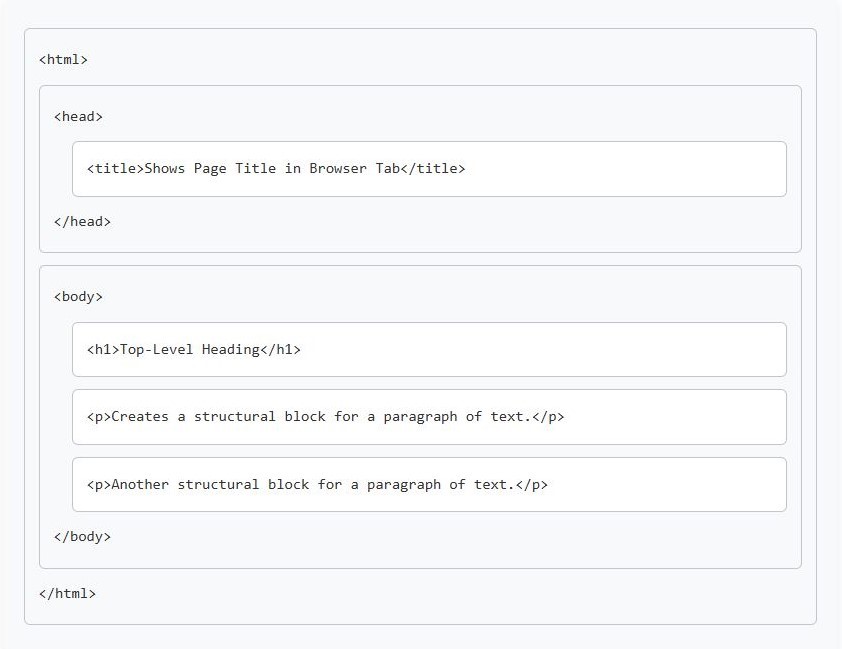
Every HTML page is mainly divided into two parts: the Head section and the Body section, both placed inside the main/root <html> container.
This HTML Page structure helps you understand how HTML tags are placed inside each other.
HTML Page Structure Explained
While the <html> tag is the root tag or container, a proper file actually starts with <!DOCTYPE html> at the very top. <!DOCTYPE html> is not a tag, but a declaration that tells the browser to use HTML5 standards.
Now comes the Head section. It stores information about the webpage, such as the page title, SEO details, and various links. Except for the page title, which appears in the browser tab, the content inside the Head section is not directly visible to the user.
The Body section is the visible part of the webpage for the user. Everything that appears in the web browser, such as text, images, buttons, and other content, is part of the Body section.
If we were to look at it as a “family tree,” it looks like this:
- <!DOCTYPE html> → The Declaration.
- <html> → The Parent/Root.
- <head> → The Invisible Meta-info.
- <body> → The Visible Content.
- <html> → The Parent/Root.
Wrapping Up – HTML Introduction
In this HTML Introduction, you learned: what HTML is, why HTML is important, a simple HTML example, the purpose of common tags, and the HTML page structure.
Now that the foundation is clear, the next step is to learn HTML Editor.
Stay Connected & Keep Learning!
Did you find our articles and tutorials helpful? Stay updated with more expert tips—Follow us on Facebook and Instagram!
Be Part of a Global Tech Network! Join our Official Facebook Group for live Q&A, discussions, and networking with a global tech community!